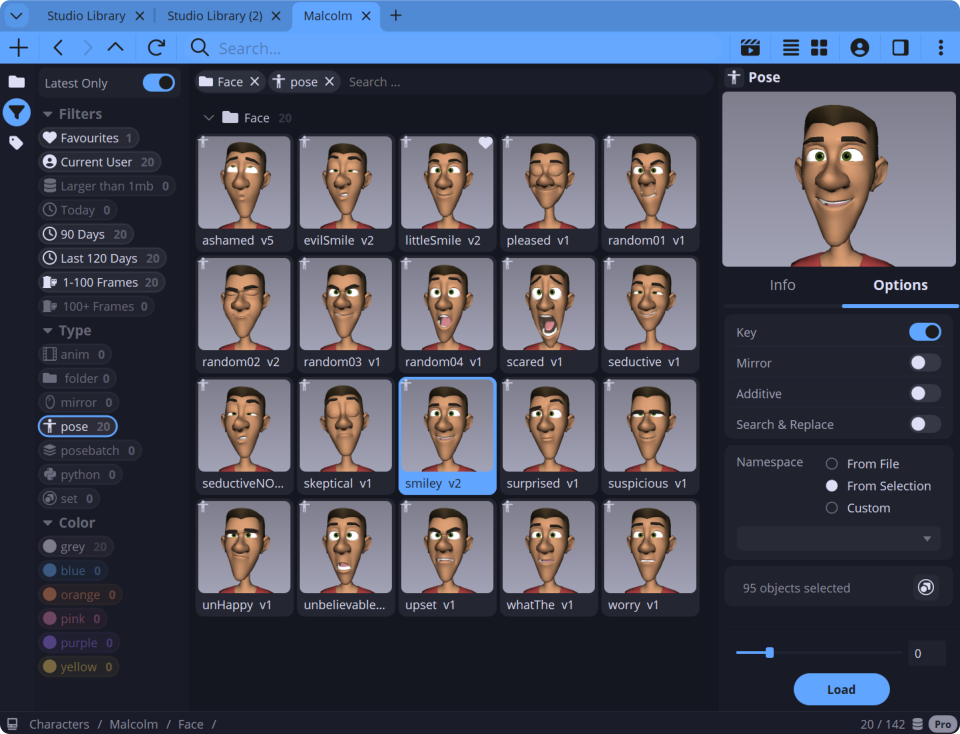
From solo artists to studio teams
Studio Library Pro adds tools for artists, teams and animation pipelines.
Batch Poses
Save and update many poses at once. Turn timeline bookmarks into poses with a click.
Playblast Studio
Create multi-view playblasts for one animation in a single pass.
Version History
Create new versions without overwriting assets. Browse and restore older versions when needed.
Free to start
Start free, or upgrade to Pro when you need more.
Free
Core pose and animation library.
- Core pose and animation library
- Mirror poses and animation
- Create easy to use selection sets
- Free, supported and production ready
Pro
Access the latest updates & features.
- Save versions of each asset
- Batch save poses plugin
- Multi Playblast & Media player
- Create multiple tabs & projects
Looking for the latest Pro version, older builds or release notes? Sign in to view downloads.
Compare Free and Pro
Free includes the core tools. Pro adds advanced features.
| Feature | Free | Pro |
|---|---|---|
| Save poses and animation | ✓ | ✓ |
| Mirror poses and animation | ✓ | ✓ |
| Pose blending | ✓ | ✓ |
| Insert, merge and replace animation | ✓ | ✓ |
| Selection sets | ✓ | ✓ |
| Folders and drag/drop organisation | ✓ | ✓ |
| Multiple projects | ✓ | |
| Batch poses | ✓ | |
| Asset Versioning | ✓ | |
| Playblast Studio | ✓ | |
| Built-in media player | ✓ | |
| Tabs, filters and latest-only browsing | ✓ | |
| Folder locking and versioning | ✓ |
FAQ
Quick answers before you download.
What is Studio Library?
Studio Library is an asset library for Autodesk Maya. It helps artists save, organise and reuse poses, animation, selection sets and other assets.
Which version should I start with?
Start with the free version. It includes the core pose and animation library tools and remains free and supported.
How do I install Studio Library?
Download and unzip the studiolibrary.zip file. Then drag and drop the install.mel file onto the Maya viewport. Click the Studio Library icon on the Maya shelf to run it.
What does Pro add?
Pro adds more tools for teams, including multiple projects, batch poses, Python assets, playblast tools, media review, tabs, filters, folder locking and versioning.
Is Pro a subscription?
Yes. Studio Library Pro is $10 per user, per year.
Which Maya versions are supported?
Studio Library supports Autodesk Maya 2023–2027 on Windows, Linux and macOS.